Product Overview

Ant Smart Emergency Management System is a smart emergency management system for all industries and sectors. It focuses on the entire emergency management process and integrates six core modules: daily duty, resource management, early warning response, plan management, training and drills, and professional knowledge base. It covers the full business scenarios of pre-incident prevention, in-incident response, and post-incident optimization.

Through centralized data display, standardized process control, and visualized task tracking, the system enables efficient allocation of emergency resources, rapid handling of emergency events, and continuous improvement of emergency capabilities. It provides closed-loop emergency management support for government departments, enterprises, and institutions, helping reduce losses from emergencies and modernize emergency management.

Ant Smart Emergency Management System is a basic emergency management application. It focuses on the core management needs of government and enterprise emergency operations and provides standardized emergency management functions that meet basic operations and data management needs in routine emergency scenarios. If you need to add a professional command and dispatch module on top of basic management, serve larger-scale scenarios, or customize flexible functions, we recommend Ant Smart Emergency Command and Dispatch Management System.

Product Features

1. Full-process closed loop with no business breakpoints

It runs through the entire emergency management chain, from duty scheduling and resource reserves to warning generation and event handling, and then to training, drills, and plan iteration, with seamless connections between all stages. For example, an early warning event can be directly converted into an emergency event for assignment and handling. After handling, processes can be optimized through training and drills, avoiding information silos.

2. Data-driven decisions and visualized information

  • The home page displays core data in a centralized way, including the number of emergency supplies, team members, and experts as well as warning statistics, so users can quickly grasp the overall situation.
  • Each module supports multi-dimensional filtering, such as event level and resource status. Key information is clearly presented in lists to support precise decision-making.

3. Standardized control to improve handling efficiency

Core processes are designed in a standardized way. For example, resource outbound requires application and review, and emergency events advance according to reporting, assignment, handling, acceptance, and closure. This reduces human error, ensures that emergency handling follows clear rules, and improves response speed and standardization.

4. Multi-role collaboration with flexible adaptation

The system supports multi-role permission division. Duty leaders view global data, duty personnel complete check-in and reporting, reviewers process applications, and handlers follow up on events. Information is synchronized in real time, enabling efficient cross-department and cross-position collaboration.

Product Functions

Ant Smart Emergency Management System is a standard and general emergency management system covering full-process emergency business management.

I. Home Page

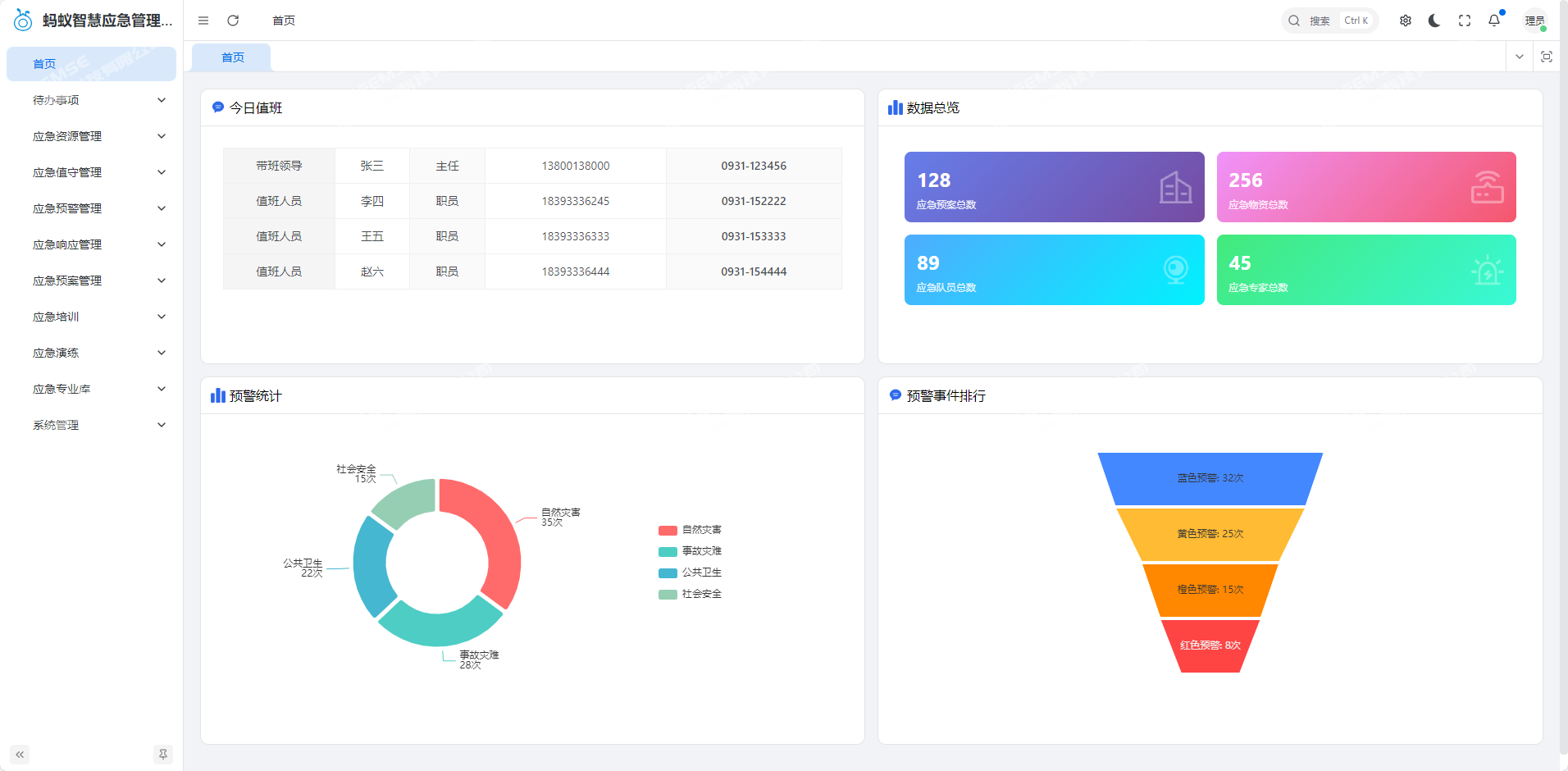
The home page displays key information in a centralized way, helping users quickly understand the overall emergency management situation.

Duty information: Displays the duty team for the day, including the names, positions, and contact information of the duty leader and duty personnel, ensuring smooth emergency communication.

Data overview: Presents core data indicators, including the number of emergency plans, emergency supplies, emergency team members, and emergency experts, directly reflecting the scale of emergency reserves.

Warning statistics: Displays warning events by category, including natural disasters, accident disasters, public health, and social security. It marks the number of warnings at four levels—blue, yellow, orange, and red—as well as warning event rankings, helping users quickly identify high-risk areas.
1760672209_1.jpg

II. To-do Items

The to-do items module focuses on task management and presents tasks by business type, ensuring key work is not missed and improving processing efficiency.

(1) Review Items

Supports filtering tasks by time, submitter, review status, and review type. It covers emergency supply outbound applications, emergency plan reviews, emergency warning event generation, and other types. It provides operation options such as Approve, Reject, and View Details.

(2) Assigned to Me

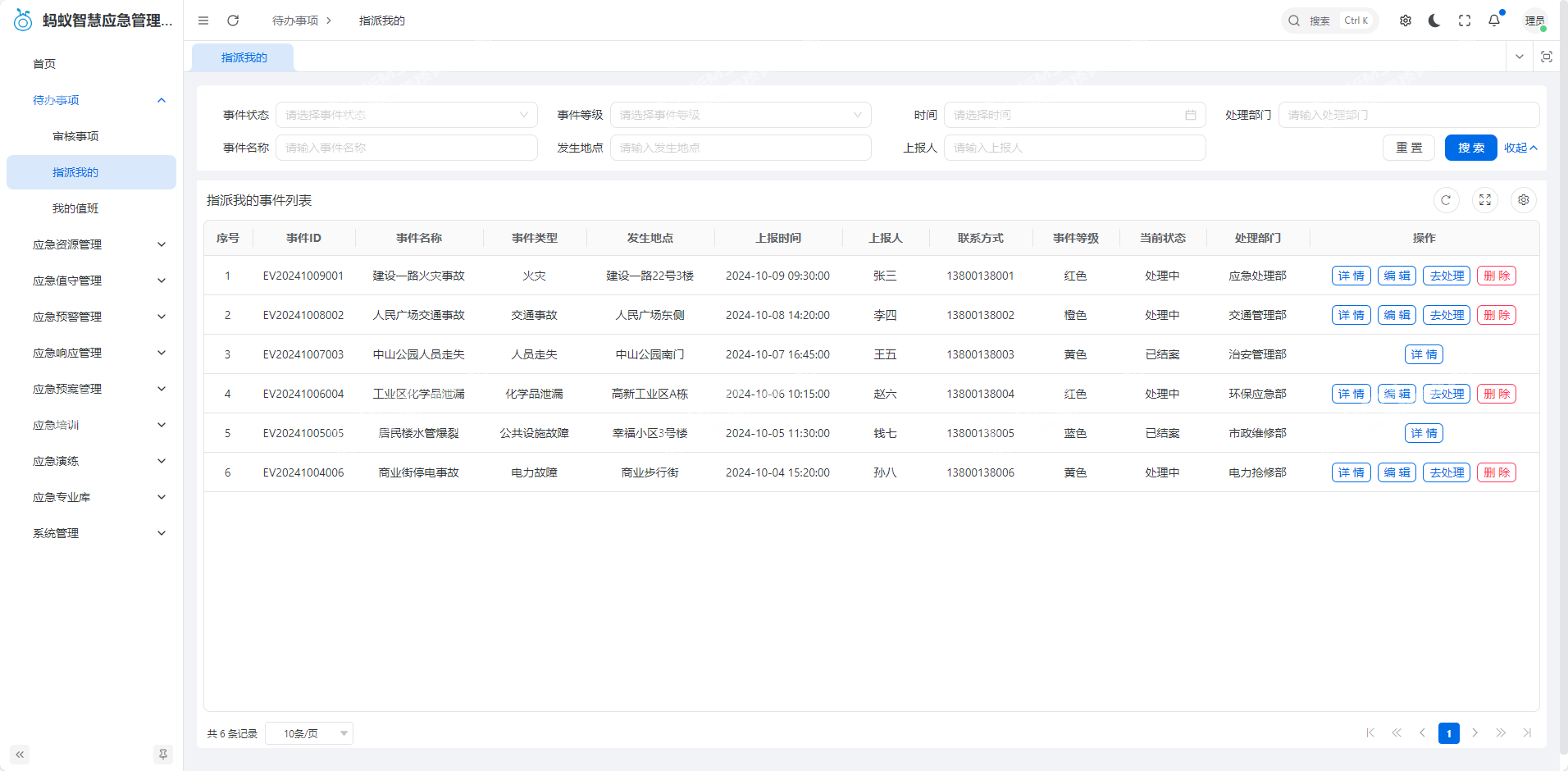
Displays emergency events assigned to the current user in a centralized way. Events can be filtered by event level (red, orange, yellow, blue), status (processing, closed), occurrence location, and reporter.

Event information includes ID, name, type, occurrence location, reporting time, reporter, and contact information. It supports operations such as View Details, Handle, and Delete.
1760672260_2.jpg

(3) My Duty

Records the user's personal duty information and supports filtering by duty personnel, check-in status (checked in, not checked in), and check-in time.

Displays duty date, position, check-in time, and duty status, such as All normal and Equipment fault handled. Personnel who have not checked in are marked with leave or compensatory leave reasons. It supports operations such as Report Duty Status and Check In.

III. Emergency Resource Management

This module realizes full-lifecycle management of emergency resources, covering resource query, inbound, outbound, warnings, and classification, ensuring efficient and precise resource allocation.
1760672311_3.jpg

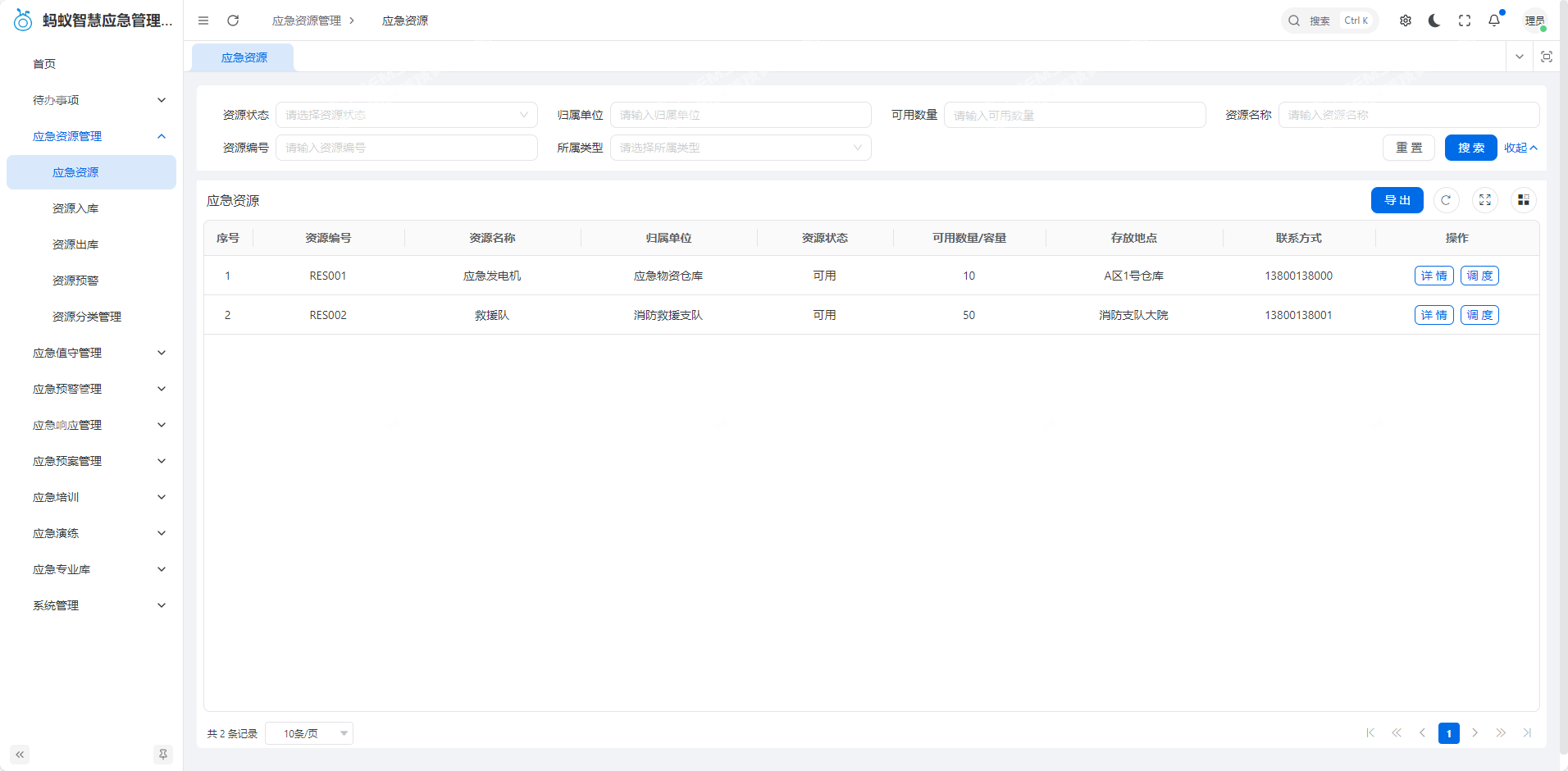
(1) Emergency Resources

Supports filtering by resource status (available, etc.), owning organization, name, number, and type. It displays resource number, name, owning organization, available quantity/capacity, storage location, and contact information. It provides operations such as View Details and Dispatch.

(2) Resource Inbound

Provides an entry point for resource inbound operations and supports entering basic information for new emergency resources, such as name, type, owning organization, quantity, and storage location, to complete new resource registration.

(3) Resource Outbound

Filters outbound records by resource number, name, receiving organization, outbound time, and outbound status. It displays the type, receiving organization, quantity, description, time, and contact information of outbound resources.

It supports operations such as View Details, Approve, and Reject.

(4) Resource Warnings

Provides warnings for resource abnormalities such as insufficient inventory and personnel shortages. It displays the number, name, owning organization, category, available quantity, warning time, and contact information of warning resources.

It supports View Details, helping users identify resource gaps in a timely manner.

(5) Resource Classification Management

Maintains resource classifications and supports filtering by resource name, number, and type. It displays resource number, name, type, warning value, and creation time. It provides operations such as Add Classification, Edit, and Delete.

IV. Emergency Duty Management

Built around duty operations, this module realizes digital management of duty scheduling, check-in, and statistics, ensuring standardized and orderly daily emergency duty.

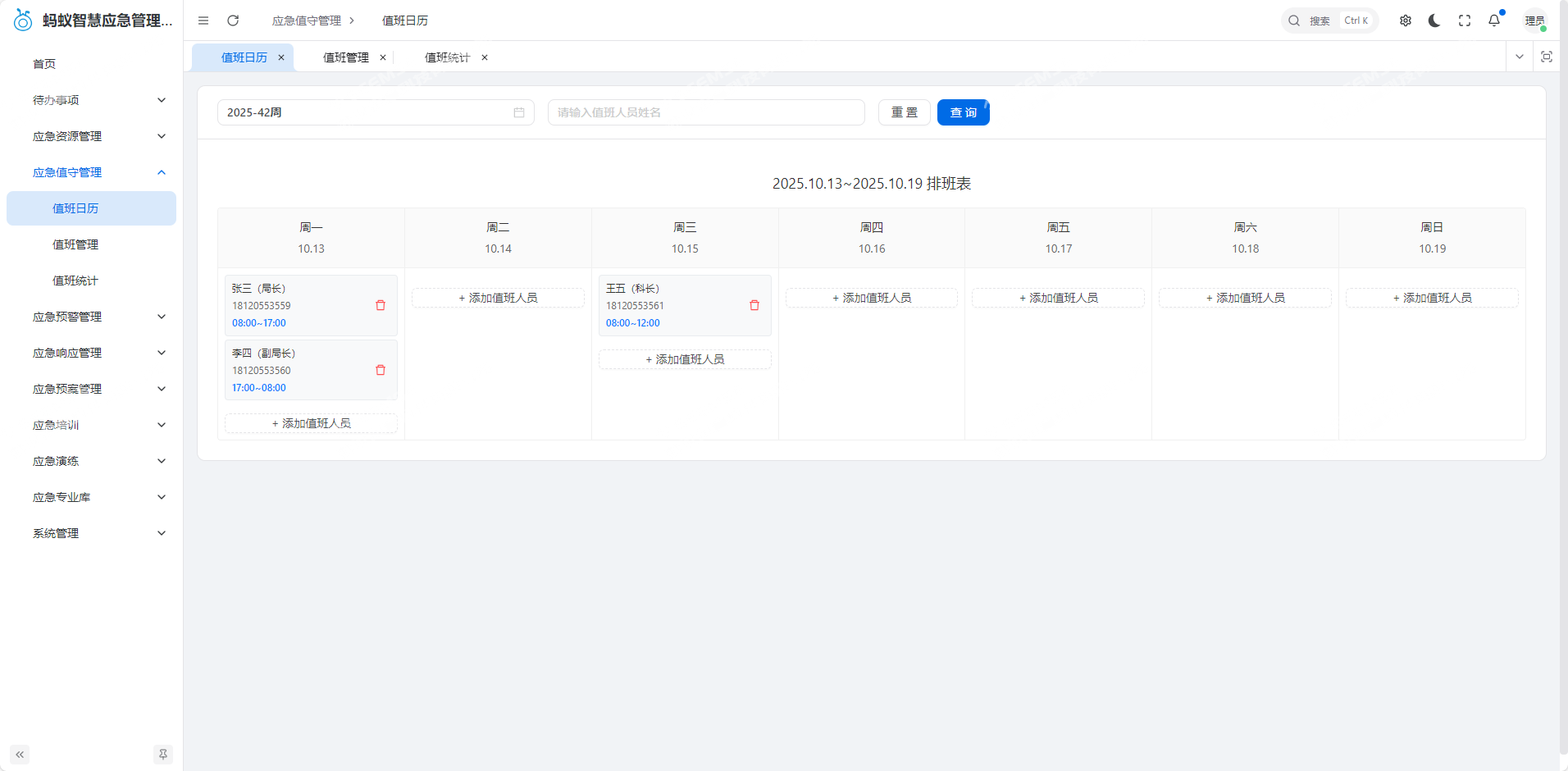
(1) Duty Calendar

Displays the duty schedule by week, marking the name, position, and contact information of daily duty personnel and clarifying duty periods. It supports Add Duty Personnel to flexibly adjust duty arrangements.
1760672398_4.jpg

(2) Duty Management

Filters duty records by duty personnel, check-in status, and check-in time. It displays duty date, personnel, position, check-in status, check-in time, and duty status. It provides operations such as Report Duty Status and Check In.

(3) Duty Statistics

Counts duty times by duty personnel and duty month, generates duty statistics reports, and displays duty personnel, position, duty month, and number of times. It supports View Details to view specific duty records.

V. Emergency Warning Management

Focuses on warning event processing and realizes full-process management of warning addition, tracking, and cancellation, improving the response speed of risk warnings.
1760672422_5.jpg

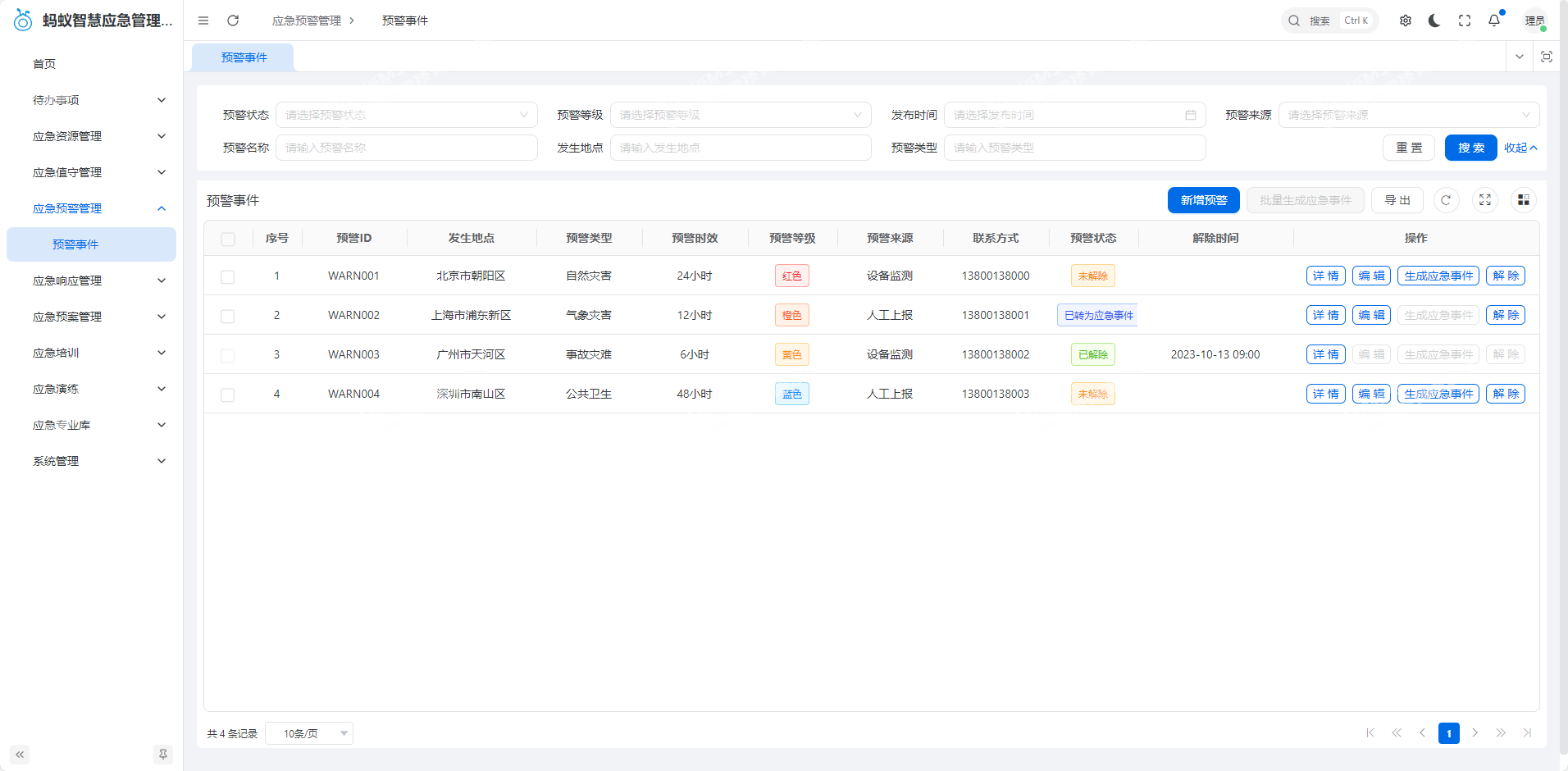
Warning Events

Filters warning records by warning status (not cancelled, cancelled, converted to emergency event), source, name, and type. It displays warning ID, occurrence location, contact information, status, and cancellation time. It supports operations such as Add Warning, Generate Emergency Event, Cancel Warning, and Edit. When adding a warning, users need to fill in information such as warning name, occurrence location, time, level, type, and description.

VI. Emergency Response Management

Handles emergency events and realizes closed-loop management of event reporting, assignment, handling, and closure, improving emergency handling efficiency.
1760672617_6.jpg

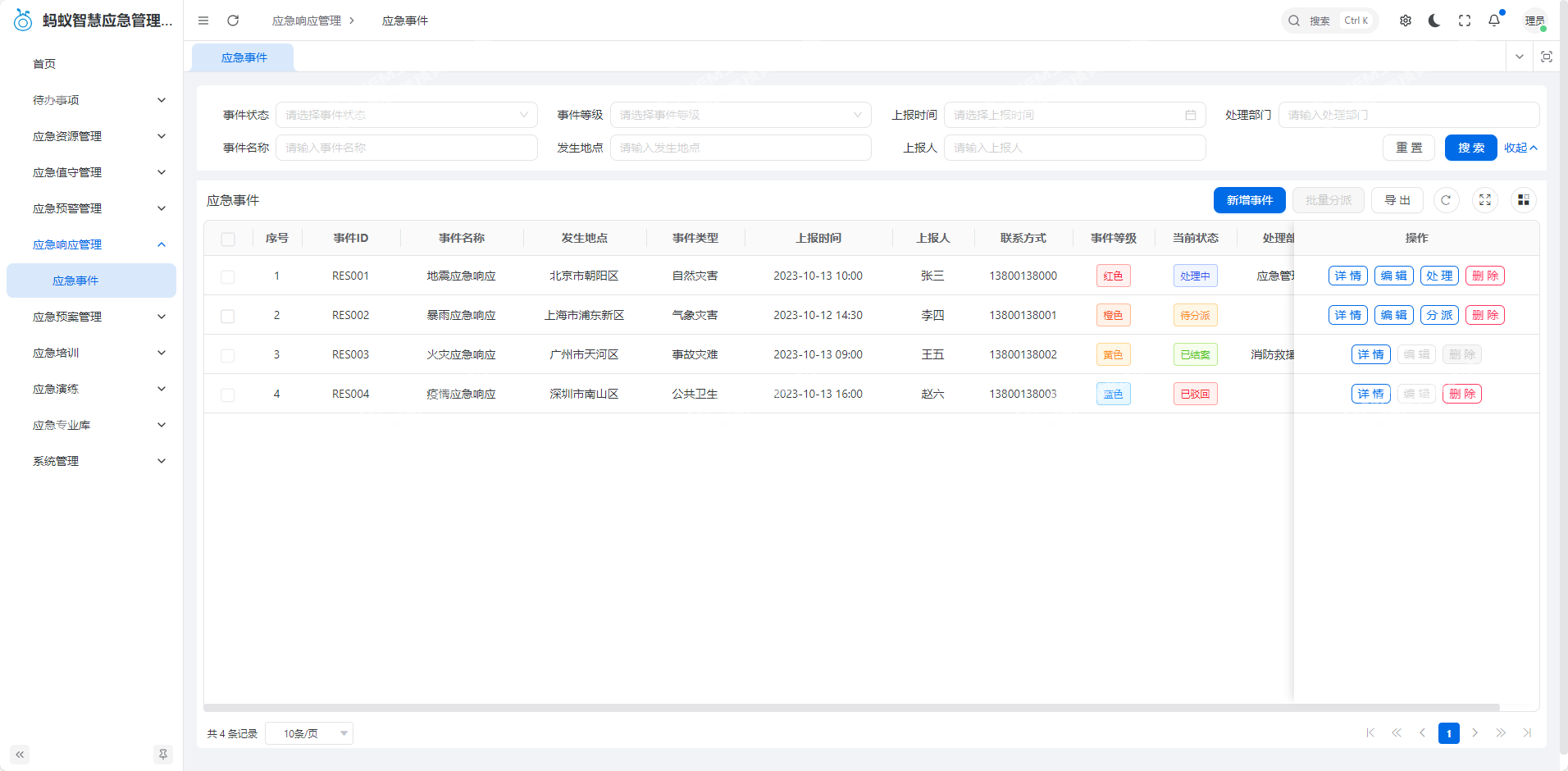
Emergency Events

Filters events by event status (processing, pending assignment, closed, rejected), level, reporting time, handling department, name, occurrence location, and reporter.

Displays event ID, name, occurrence location, type, reporting time, reporter and contact information, level, status, and handling department. It supports operations such as Add Event, Batch Assign, View Details, Handle, Edit, and Delete.

In the emergency handling step, users can specify the handling department and person in charge, record handling content, and upload attachments.

VII. Emergency Plan Management

Realizes the preparation, release, review, and management of emergency plans, ensuring plans are standardized and usable and providing a basis for emergency handling.
1760672647_7.jpg

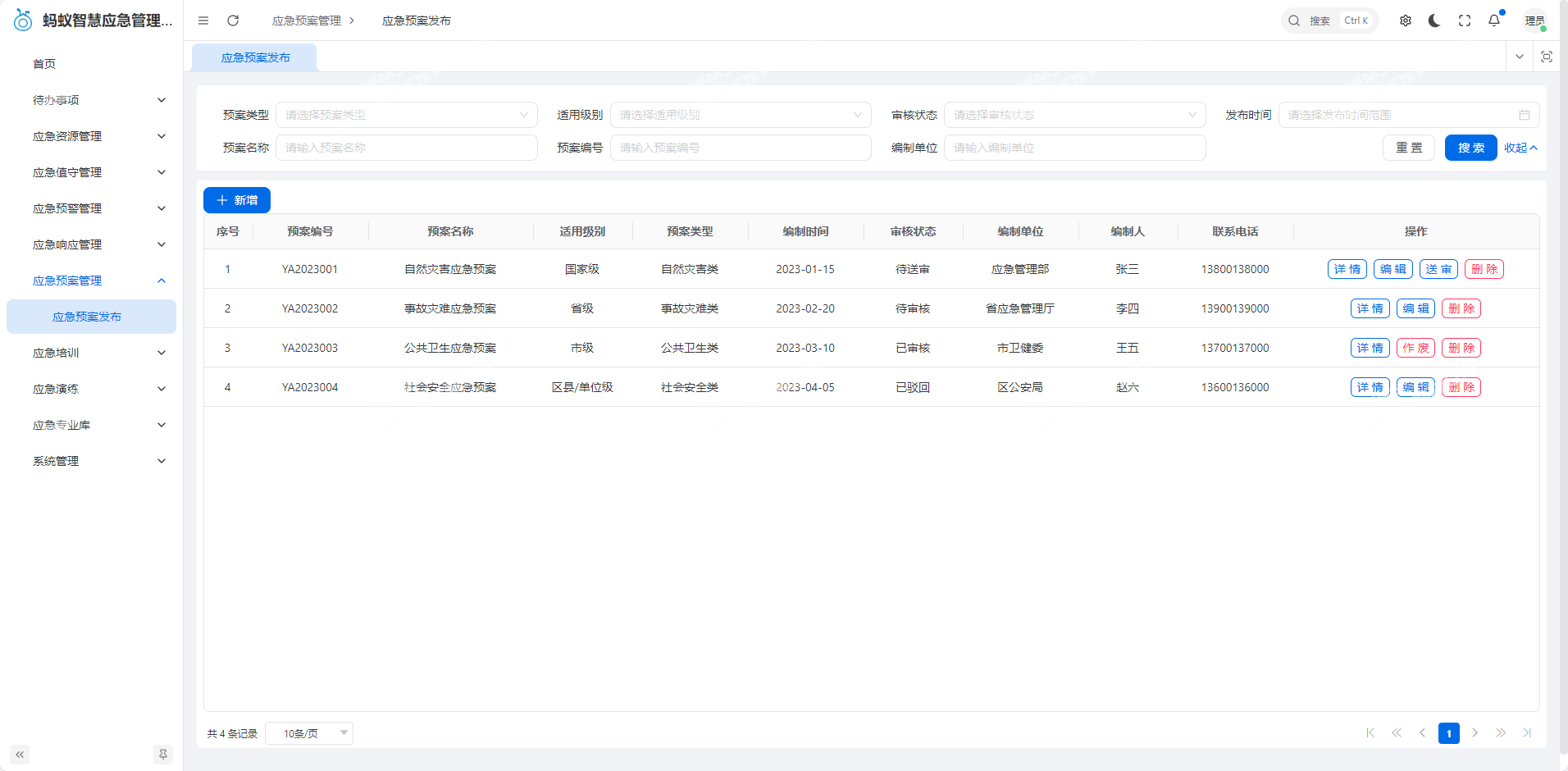
Emergency Plan Release

Filters plans by plan type (natural disaster, accident disaster, etc.), applicable level (national, provincial, etc.), review status (pending submission, pending review, reviewed, rejected), release time, name, number, and preparing organization.

Displays plan number, name, type, applicable level, preparation time, review status, preparing organization, preparer, and contact information. It supports operations such as Add Plan, View Details, Edit, Submit for Review, Void, and Delete.

VIII. Emergency Training

Carries out full-process management around emergency training, covering training plans, preparation, records, and evaluation, improving personnel emergency capabilities.

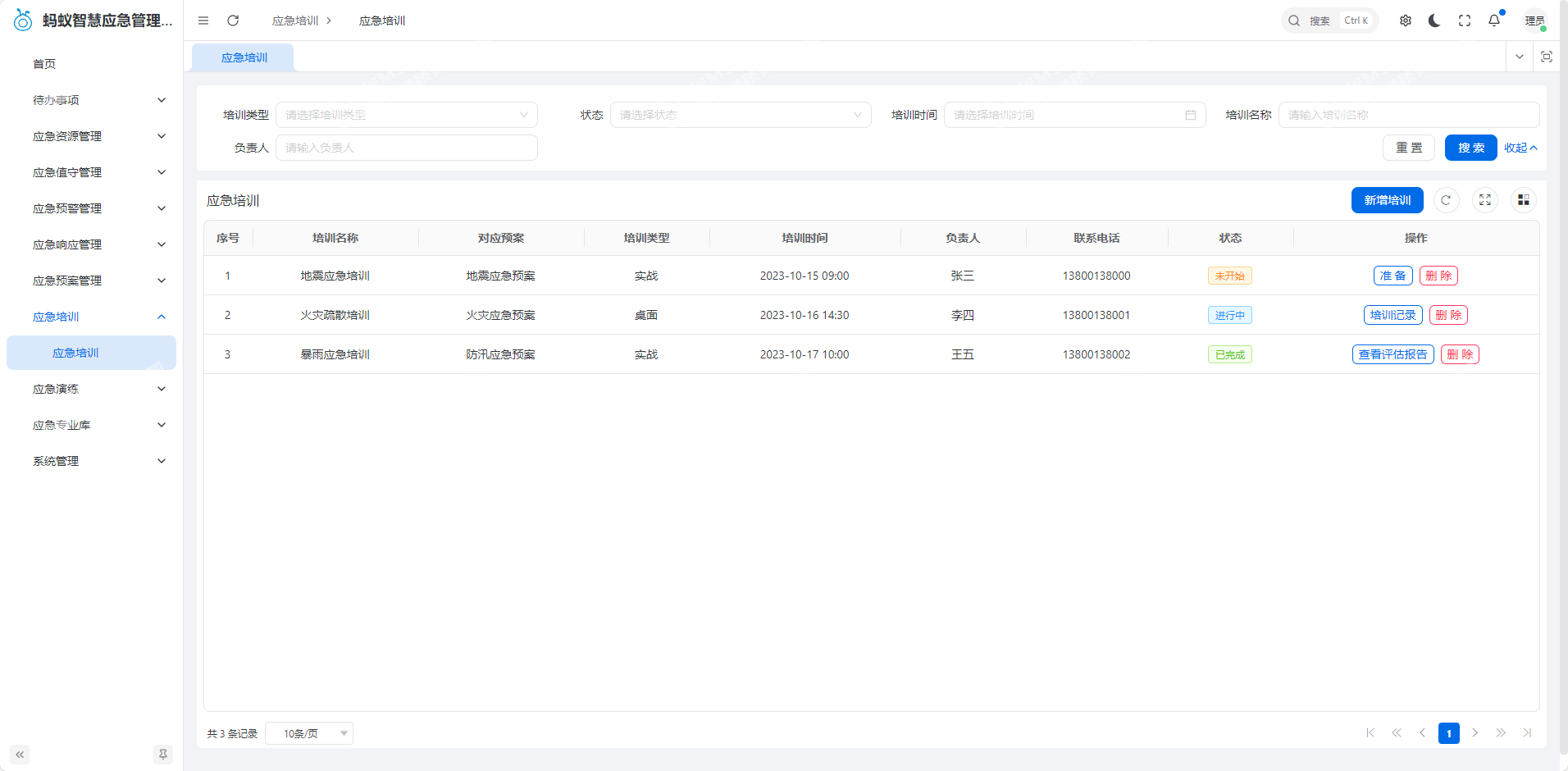
Filters training records by training type (live, tabletop), status (not started, in progress, completed), training time, name, and person in charge.

Displays training name, corresponding plan, type, time, person in charge and contact information, and status. It supports operations such as Add Training, View Training Records, Delete, and View Evaluation Report.

In the training preparation step, users can select personnel to notify (supporting SMS/system notifications), prepare materials, and upload files;

Training records can include event descriptions and upload on-site images;

Evaluation reports can include scores, record issues, and specify rectification owners.
1760672671_8.jpg

IX. Emergency Drills

Benchmarking the emergency training module, it realizes plan formulation, execution, and evaluation management for emergency drills, testing plan feasibility and team practical capabilities.

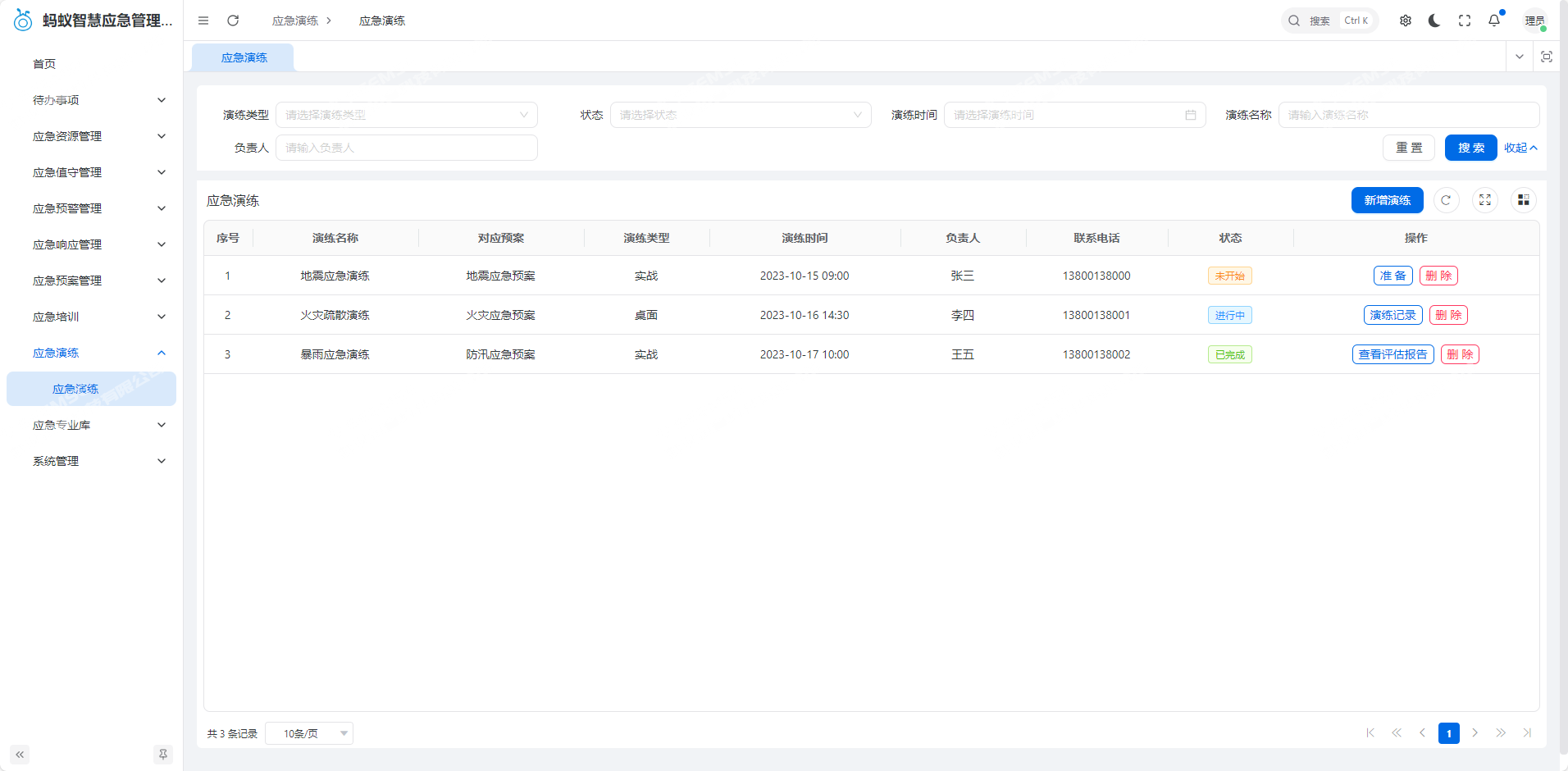
Filters drill records by drill type (live, tabletop), status (not started, in progress, completed), drill time, name, and person in charge.

Displays drill name, corresponding plan, type, time, person in charge and contact information, and status. It supports operations such as Add Drill, View Drill Records, Delete, and View Evaluation Report.
1760672719_9.jpg

X. Emergency Professional Library

Builds a reserve library of emergency knowledge and cases, providing reference support for emergency decisions and handling.

(1) Knowledge Base

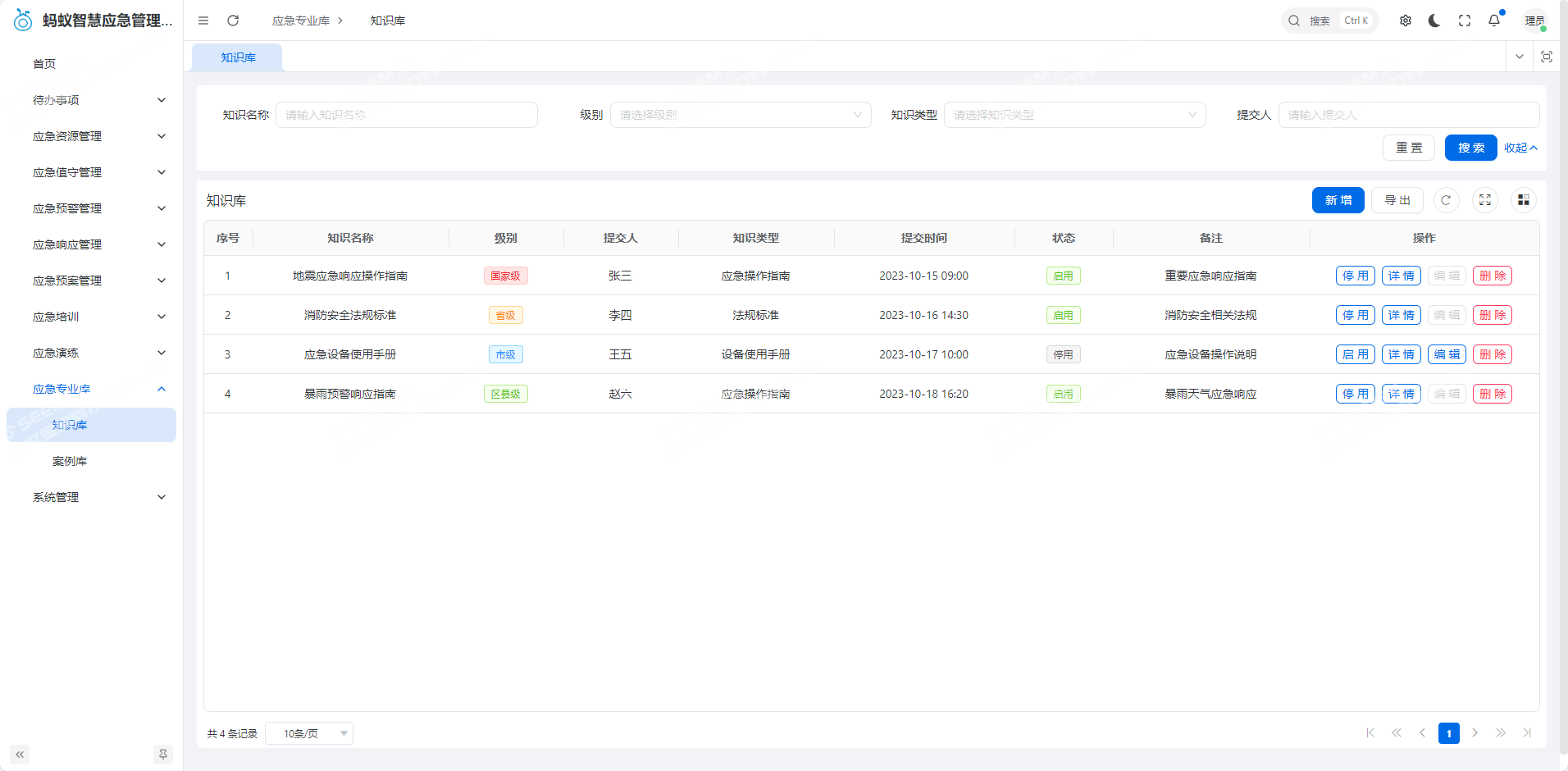
Filters knowledge content by knowledge name, level (national, provincial, etc.), type (emergency operation guide, regulations and standards, etc.), and submitter.

Displays knowledge name, level, type, submitter, submission time, status (enabled, disabled), and remarks. It supports operations such as Add Knowledge, View Details, Edit, Enable/Disable, and Delete.
1760672993_10.jpg

(2) Case Library

Stores past emergency handling cases and provides case query and reference functions, offering experience reference for handling similar emergency events.

Application Scenarios

1. Daily duty of government emergency management departments

  • Use Emergency Duty Management to create duty calendars, record situations, and count duty times, ensuring no gaps in 24-hour duty.
  • The home page displays the contact information of the day's duty team and warning statistics, facilitating rapid response to emergencies.

2. Emergency resource management in enterprises and institutions

  • Monitor the inventory and status of resources such as emergency generators and rescue teams, and set warning thresholds (for example, warn when generator inventory is below 5 units).
  • In the event of an accident, quickly initiate resource outbound applications and efficiently allocate supplies and teams to support handling.

3. Emergency handling of unexpected events

  • In unexpected situations such as fires and traffic accidents, generate warning events and convert them into emergency events, then assign them to corresponding departments such as firefighting and transportation.
  • Handlers update progress and upload attachments, while managers track the process to ensure rapid event closure.

4. Emergency capability improvement and plan optimization

  • Conduct live/tabletop training and drills for scenarios such as earthquakes and heavy rain, record the process, and generate evaluation reports to identify process shortcomings.
  • Optimize plans with Emergency Plan Management and use the Professional Library for theoretical and case references to improve emergency capabilities.

Frequently Asked Questions

Q1: What is Ant Smart Emergency Management System used for?

It is an emergency management software developed by SEEMSE (Jinzhang Technology) for government departments, enterprises, and institutions. It manages the entire end-to-end process of emergency response: how to schedule duty personnel in normal times, how to store supplies and teams, how to issue risk warnings, how to dispatch and handle incidents, and how to review and improve afterward. The system is divided into six modules: daily duty, resource management, early warning response, plan management, training and drills, and professional knowledge base. It follows one line from prevention to handling and then to optimization, so users do not need to switch back and forth among multiple systems.

Q2: What functional modules does this system include?

A: There are six parts. Daily duty manages scheduling, check-in, and duty statistics; resource management manages inbound and outbound of supplies and teams as well as inventory warnings; early warning response manages the addition, tracking, and cancellation of warnings; plan management manages the preparation, submission for review, release, and voiding of plans; training and drills manage plans, process records, and evaluation reports; the professional knowledge base is divided into a knowledge base and a case library, storing operation guides, regulations and standards, and past handling cases. In addition, the home page provides a one-screen overview that brings together the contact information of the day's duty personnel, the number of plans, supplies, and teams, and statistics on four types of warnings.

Q3: Which organizations are suitable for this system?

A: Mainly two types. One is government emergency management departments, used for 24-hour duty arrangements, warning tracking, and incident dispatch. The other is enterprises and institutions, such as factories, industrial parks, shopping malls, and schools, which manage their own emergency generators, rescue teams, and firefighting equipment and can quickly initiate supply outbound when incidents occur. Because the processes are standardized, there are few industry restrictions—as long as you have people on duty every day, material ledgers to maintain, and plans to implement, the system can basically be applied.

Q4: How does the system move from discovering a warning to closing an event?

A: A warning is created in Emergency Warning Management by filling in the name, occurrence location, time, level, type, and description. Levels are divided into four levels: blue, yellow, orange, and red. If the risk escalates, clicking Generate Emergency Event directly converts it without re-entering the information. The event then follows reporting, assignment, handling, acceptance, and closure: during assignment, the handling department and person in charge are specified; handlers update progress and upload attachments; managers can see at any time which step the process has reached. After completion, users can go back to training and drills to fix process gaps or directly revise the plan.

Q5: How are emergency supplies and rescue teams managed? Will the system remind users when inventory is insufficient?

A: In Emergency Resource Management, resources can be filtered by status, owning organization, type, and name. Each record includes a number, storage location, available quantity, and contact information. New resources are registered through Resource Inbound, and requisitions go through Resource Outbound. Outbound requires application and review, and who applied, who approved, and how much was taken are all recorded. Insufficient inventory triggers automatic warnings—for example, if a warning value of 5 units is set for generators, any number below that will enter the Resource Warnings list to remind you to restock. Personnel shortages are also reflected there.

Q6: Can emergency training and drills be managed in the system?

A: Yes. Training and drills are two independent modules with the same logic. When creating a new record, select live or tabletop and fill in the corresponding plan and person in charge; in the preparation stage, you can send SMS or system notifications to participants, prepare materials, and upload files; during execution, record the process and upload on-site photos; after completion, generate an evaluation report with scores, issues, and rectification owners. These records and reports are retained to test whether the plan actually works and which steps still need improvement.